
Claude Code Worktrees Filling Your Disk? How to Find and Remove Leftover Git Worktrees
Parallel Claude Code and Codex git worktrees duplicate node_modules, Rust target, and Swift .build folders. Audit them read-only and clean up safely on macOS.
Claude Code and Codex worktrees fill up your Mac because Git shares commit history across worktrees, but never shares untracked build directories like node_modules, Rust target/, Swift .build/, or Python .venv/. Every parallel agent task that runs npm install, cargo build, or swift build inside its own git worktree creates a fresh multi-gigabyte copy of dependencies—and those folders stay on disk even after your PR is merged unless you remove the worktree with git worktree remove or clear its build directories.
On one developer Mac we measured (read-only du across the home folder, excluding ~/Library), project build artifacts alone reached 66.3 GB across 304 node_modules folders, 5.1 GB across 8 .venv folders, and 2.9 GB across 7 .build folders—alongside ~/.claude (1.9 GB), ~/.local/share/claude (902 MB), and ~/.codex (5.2 GB). Heavy parallel-agent users hit much steeper spikes: developers on r/ClaudeCode and r/ClaudeAI have reported leftover agent worktrees growing a single workspace to 95 GB, and parallel Rust agent checkouts generating 10–40 GB target/ folders each until the startup disk hit 95%+ full.
1. Run a read-only audit of your worktrees first#
Before deleting anything, measure where agent worktrees and their build folders actually sit on your Mac. The commands below are strictly read-only.
Check worktree storage across common coding-agent locations#
# Total disk usage in common agent worktree directories (read-only)
du -sh \
  ~/.claude/worktrees \
  ~/.codex/worktrees \
  ~/.cursor/worktrees 2>/dev/null

# Largest individual worktree folders inside ~/.claude/worktrees and ~/.codex/worktrees
du -sh ~/.claude/worktrees/* ~/.codex/worktrees/* 2>/dev/null | sort -h | tail -20
List every Git worktree registered by a repository#
Claude Code and other tools can also create worktrees inside a hidden folder inside the repo itself (such as <repo>/.claude/worktrees) or in a sibling folder next to your repo. Inside any repository, run:
cd ~/Repos/your-project
git worktree list
To see whether any worktrees are locked, detached, or already missing from disk (prunable), add --porcelain:
git worktree list --porcelainFind the biggest node_modules, target, and .build folders inside worktrees#
find ~/.claude/worktrees ~/.codex/worktrees ~/.cursor/worktrees \
  \( -name node_modules -o -name target -o -name .build -o -name .venv \) \
-type d -prune -exec du -sh {} + 2>/dev/null | sort -h | tail -252. Where Claude Code, Codex, and Cursor put worktrees#
Different AI coding tools store isolated worktrees in different places, and each location behaves slightly differently when you audit or clean it:
| Location | Created by | What eats the space | Safe manual cleanup | CleanBit coverage |
|---|---|---|---|---|
~/.claude/worktrees | Claude Code | Duplicated node_modules, target/, .build/, .venv/ per worktree | git worktree remove <path> (or delete build dirs inside idle checkouts) | Build Artifacts scans this path by default, parses .git gitdir: to skip Git-tracked files, moves build folders to Trash |
<repo>/.claude/worktrees | Claude Code (repo-local worktree mode) | Same per-task build folders inside a hidden repo subfolder | Run git worktree list and git worktree remove <path> inside the repo | Manual only (CleanBit skips hidden . subfolders during recursive traversal) |
~/.codex/worktrees | OpenAI Codex app / CLI | Duplicated node_modules, Rust target/, Python .venv/, etc. | git worktree remove <path> or remove build folders in finished tasks | Build Artifacts scans this path by default, parses .git gitdir:, moves build folders to Trash |
~/.cursor/worktrees (or <repo>/.cursor/worktrees) | Cursor parallel agents | Isolated checkouts with separate dependency and build trees | Run git worktree list / git worktree remove <path> or clear via Cursor | Manual only (not currently in CleanBit's default search roots) |
Visible sibling worktrees (e.g., ~/Repos/app-feature-a) | Manual git worktree add or custom agent scripts | Standard project build artifacts | git worktree remove <path> and git worktree prune | Build Artifacts scans visible home folders (excluding Library, Movies, Pictures, etc.) |
/private/tmp | Agent-triggered temporary Xcode or test builds | Temporary DerivedData or sandboxed test artifacts | Reboot macOS or inspect /private/tmp when no builds are active | Outside sandbox (CleanBit runs in App Sandbox without root and cannot access /private/tmp) |
3. How to safely remove leftover Git worktrees (without losing work)#
Never start with rm -rf on a worktree directory. Removing a worktree folder directly leaves stale metadata in .git/worktrees/ and gives you zero warning if an agent left uncommitted edits behind.
Step 1: Check for uncommitted changes and unmerged commits#
For each worktree path printed by git worktree list, inspect its working tree before touching it:
# Check uncommitted or untracked files inside a specific worktree
git -C /path/to/worktree status --short

# From your main repo, see which branches have NOT been merged into main
git branch --no-merged main
If git status --short shows changes you want to keep, commit them or create a patch before removing the worktree.
Step 2: Remove finished worktrees with git worktree remove#
git worktree remove refuses to delete a worktree that has untracked or modified files unless you pass --force, making it much safer than rm -rf:
# Run from your main repository directory
git worktree remove /path/to/old-worktree
If Git refuses because the only leftover files are disposable build caches (such as node_modules or target) and you have already confirmed no source edits exist, remove the build folder first or pass --force only after verifying git -C /path/to/old-worktree status:
# Only after confirming no wanted source changes remain
git worktree remove --force /path/to/old-worktree
Step 3: Clean up stale Git metadata with git worktree prune#
If you (or a coding agent) already deleted a worktree folder manually in Finder or with rm -rf, Git keeps dead administrative entries under .git/worktrees/. Preview what Git would prune first with --dry-run:
# Preview stale worktree references without changing anything
git worktree prune --dry-run --verbose

# Remove stale administrative entries
git worktree prune
Step 4: Delete merged temporary branches safely#
Use lowercase -d (never -D blindly)—Git will refuse to delete a branch if its commits are not yet merged:
git branch -d claude/old-feature-branchOption B: Keep the worktree, delete only its build folder#
If you want to keep a paused worktree branch around for reference but reclaim the gigabytes immediately, delete only the regenerable build directory inside it:
# Example: clear Rust build output or Node dependencies inside a paused worktree
rm -rf /path/to/paused-worktree/target
# or
rm -rf /path/to/paused-worktree/node_modules
If your JS/TS projects use pnpm, also run pnpm store prune afterward so unreferenced hard-linked packages are freed from ~/Library/pnpm.
4. How to prevent worktree disk bloat going forward#
- Prune right after merging: Make
git worktree remove <path> && git worktree prunepart of your PR-merge habit instead of letting 20 parallel checkouts accumulate for months. - Share package stores where possible:
pnpmhard-links packages from a single content-addressable store (~/Library/pnpm), dramatically reducing real disk consumption across multiple worktrees compared to standardnpm installcopies. (Note thatdustill counts each worktree's hard-linkednode_modulesunless deduplicated.) - Share a Rust
CARGO_TARGET_DIR(if appropriate): For Rust repos using parallel worktrees, pointing non-overlapping builds at a shared target cache—or runningcargo cleanwhen finishing a task—avoids keeping ten separate 15 GBtarget/folders on disk. - Watch the rest of your AI & developer footprint: Worktrees are only one half of agent storage. See our related guides on tracking down Claude Code, Cursor, and Codex sessions and model caches, finding and deleting old
node_modulesfolders on a Mac, whether~/Library/Cachesis safe to delete, and cleaning XcodeDerivedData.
5. Inspect worktree build artifacts visually with CleanBit (and honest limits)#
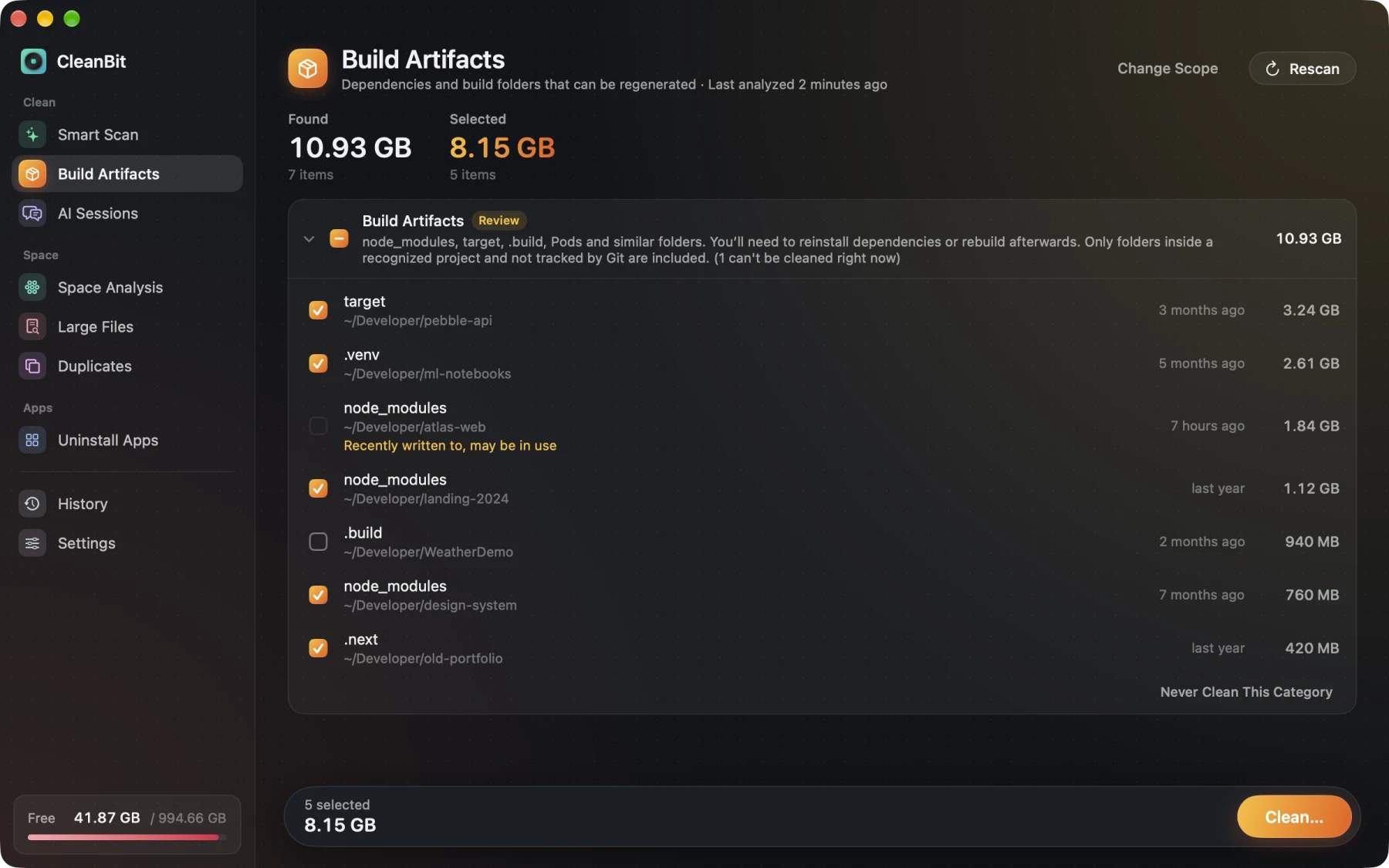
I'm the developer of CleanBit, a sandboxed Mac App Store disk space cleaner for macOS 15+. If you want to reclaim gigabytes from duplicated node_modules, Rust target/, Swift .build/, and Python .venv/ folders across your projects and worktrees without risking source code:
- Default worktree roots included: CleanBit's Build Artifacts module scans visible folders in your home directory plus
~/.claude/worktreesand~/.codex/worktrees(up to 6 levels deep), matching 26 project artifact types only when their companion project marker file is present (package.json,Cargo.toml,Package.swift,pyproject.toml,Podfile, etc.). - Native
.gitworktree parsing (gitdir:): In a Git worktree,.gitis a text file pointing togitdir: ...rather than a folder. CleanBit reads thatgitdir:pointer and parses Git index formats v2, v3, and v4 directly inside the App Sandbox—skipping any directory containing Git-tracked files, and blocking the item if an index cannot be parsed. - Review-only and always moved to Trash: Build artifacts are sorted by size, show when each project was last modified, are never pre-selected, and are always moved to the Trash. CleanBit removes only the disposable build folders—never your source code or the worktree checkout itself.
- Honest boundaries:
- CleanBit does not run
git worktree removeor delete Git branches—use Section 3 above when you want to remove the worktree checkout itself. - Default search roots do not currently include
~/.cursor/worktrees, and recursive scanning skips nested hidden folders starting with.(such as<repo>/.claude/worktreesor<repo>/.cursor/worktrees), so audit those withgit worktree list. - Because CleanBit runs inside Apple's App Sandbox with no root access, temporary build copies inside
/private/tmpremain outside its reach.
Frequently Asked Questions#
Why do Claude Code worktrees take up so much disk space?#
Git worktrees share your repository's .git object database, so source code and commit history take almost no extra space. The bloat comes from untracked dependencies and build caches—each parallel worktree installs its own node_modules, Rust target/, Swift .build/, or Python .venv/, multiplying disk usage by the number of active or forgotten worktrees.
Is git worktree remove safer than rm -rf?#
Yes. git worktree remove <path> refuses to delete a worktree if it has uncommitted changes or untracked files, and it cleans up the matching registration inside .git/worktrees/. Running rm -rf bypasses Git's safety checks and leaves stale worktree metadata behind until you run git worktree prune.
What does git worktree prune actually delete?#
git worktree prune does not delete live working directories or source files. It only removes stale administrative metadata files inside .git/worktrees/ that point to worktree folders which were already deleted or moved manually. You can preview its actions safely with git worktree prune --dry-run --verbose.
Can I delete node_modules or target/ inside a worktree without deleting the worktree?#
Yes, as long as no dev server, watcher, or coding agent is currently running in that worktree. Removing only node_modules, target/, or .build/ keeps your branch, uncommitted source files, and Git worktree intact—you just re-run npm install or cargo build if you return to that worktree later.
Does CleanBit scan Claude Code and Codex worktrees?#
CleanBit's Build Artifacts module scans ~/.claude/worktrees, ~/.codex/worktrees, and visible home folders for disposable build directories (node_modules, target, .build, .venv, etc.), parses .git gitdir: pointers to skip Git-tracked files, and moves selected build folders to the Trash. It does not remove Git worktree checkouts or branches themselves, and currently does not auto-scan ~/.cursor/worktrees or hidden repo subfolders like <repo>/.claude/worktrees.
Written by the CleanBit developer with AI assistance. All measurements were taken on a real developer Mac.