macOS 15+ · Mac App Store · App Sandbox

Free up Mac disk space.
Know what you’re removing.

CleanBit finds caches, logs, build artifacts, and app leftovers in your home folder. Every item explains what it is and what happens if you remove it—nothing is deleted until you confirm.

No root · No background helper · Free scan & 2 free cleans · One-time purchase option
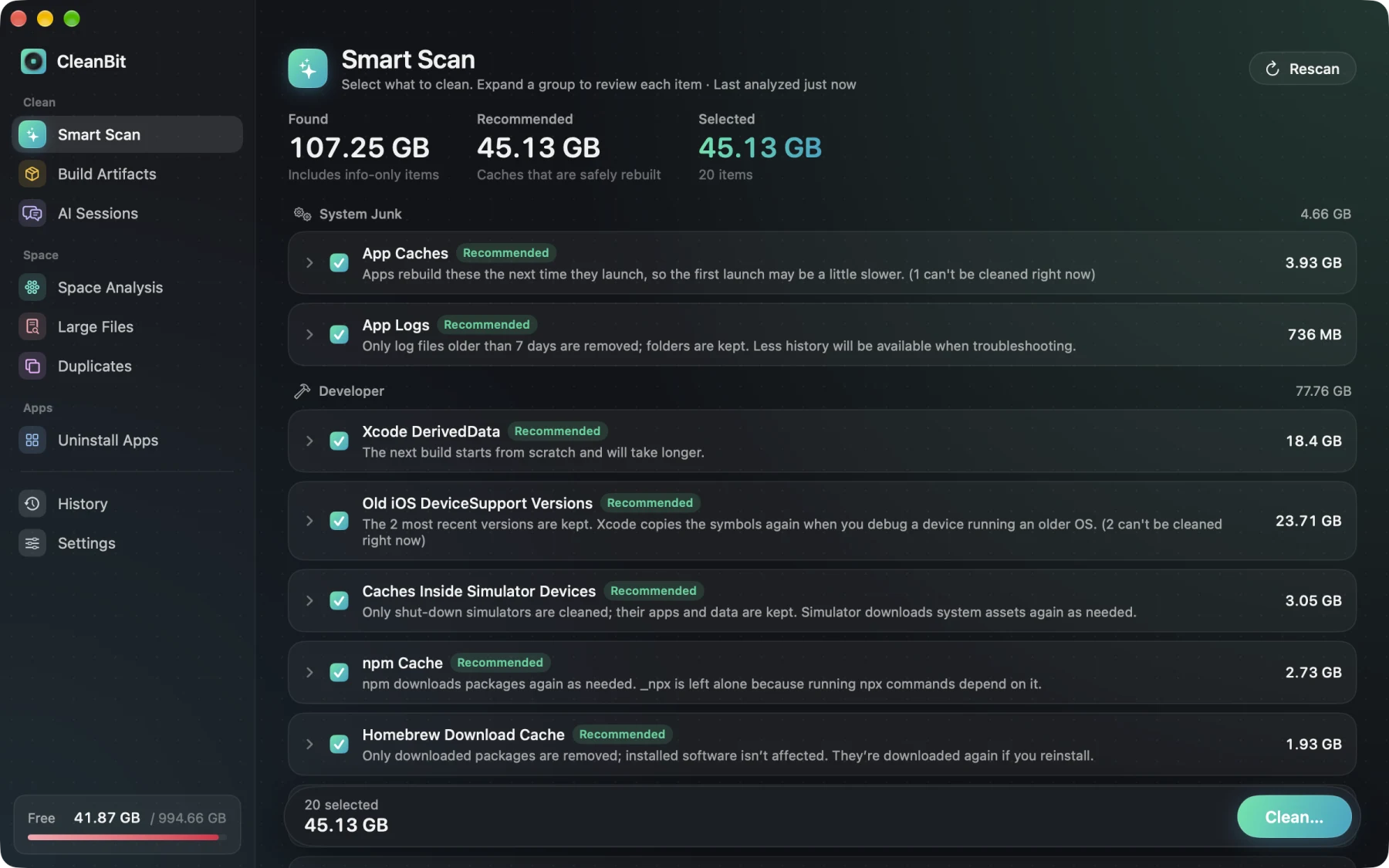
CleanBit Smart Scan

Every group is labeled Recommended, Review, or Info Only, with plain-language impact notes and active apps blocked automatically.

Video Walkthrough

See CleanBit in action on macOS

A quick real-screen walkthrough of Smart Scan, Build Artifacts, Space Analysis, and the Trash vs. permanent deletion confirmation dialog.

Safe by Design

No blind "one-click clean." Every deletion is explained and classified.

Most Mac cleaners hand you one giant number and a single button. CleanBit shows three clear tiers and lets you decide.

Recommended

Caches that rebuild themselves

App caches, browser caches (never touching cookies, history, or passwords), Xcode DerivedData, and package manager caches. Deleted permanently by default so space returns immediately—or send them to Trash in Settings.

Review

Not pre-selected. Always goes to Trash.

Project build folders (node_modules, target, .venv), old installers (.dmg, .pkg), uninstalled app leftovers, AI sessions, and uninstalled apps. Always moved to the Trash so you can put them back.

Info Only

Shown for awareness. Never deletable.

Local AI models (Hugging Face, Ollama, LM Studio), pnpm store (hard-linked), and Docker Desktop disk images. CleanBit shows how much space they take and points you to the right command.

Honest about App Sandbox boundaries

CleanBit runs strictly inside the macOS App Sandbox with no root privileges and no background daemon. We do not pretend to clean what macOS protects:

  • No APFS local snapshots or system caches
  • No iCloud Drive items (handled safely in Finder)
  • No "RAM freeing", "Mac speed-up", or antivirus claims
  • No silent background deletions
  • No file names or paths ever leave your Mac
Built for Developers & AI Coding

Clean up what Xcode, package managers, and AI tools leave behind.

Whether you ship Swift apps or build side projects with Claude Code and Codex, developer caches quietly grow to tens of gigabytes.

{}

Project Build Artifacts

Finds node_modules, target, .build, .venv, Pods, and more—showing when you last touched each project. Anything tracked by Git is automatically skipped, and removed folders go to the Trash.

⌘

Xcode & 12+ Package Managers

Covers Xcode DerivedData, old DeviceSupport versions, SwiftUI previews, shut-down simulator caches, plus npm, Yarn, pnpm, Bun, pip, uv, SwiftPM, CocoaPods, Homebrew, Go, Cargo, and Gradle.

AI

AI Tools & Old Sessions

Cleans old Claude Code versions and Claude desktop caches, and lets you review old Claude Code and Codex sessions by date range. Local models from Ollama, LM Studio, and Hugging Face are listed without risk.

◫

Space Map, Large Files & Duplicates

Drill-down folder map, large files filtered by size and last-opened date, byte-identical duplicate finder (always keeping at least one copy), and clean app uninstaller.
Transparent Pricing

Scan for free. Pay once if you want.

Every purchase is handled securely by Apple through the Mac App Store. No accounts, no dark patterns.

Free to Try

$0 forever
  • Unlimited scanning & space analysis
  • First 2 cleans completely free
  • Inspect every item & impact before buying
  • Dry Run Mode available anytime

Monthly / Yearly

$4.99 / mo · or $19.99 / yr
  • Unlimited cleaning across all modules
  • Cancel anytime in Apple Account settings
  • All future rule updates included
  • Family Sharing supported via App Store
Download on the Mac App Store
FAQ

Common questions

Why is CleanBit only on the Mac App Store and sandboxed?

Running inside Apple’s App Sandbox means CleanBit never asks for root access, never installs a persistent background helper daemon, and can only read folders you explicitly grant in a standard macOS open panel. Full Disk Access is optional and only needed for the Trash, Safari caches, and other apps’ containers.

Can deleted items be recovered?

It depends on the risk tier, and CleanBit tells you before you confirm. Recommended caches that apps rebuild automatically are deleted permanently by default (you can switch them to Trash in Settings). Review items, build artifacts, manually picked files, and uninstalled apps always move to the Trash so you can put them back.

Why doesn’t CleanBit clean APFS local snapshots or system caches?

macOS protects system locations and APFS snapshots outside the App Sandbox. Rather than asking for root privileges or claiming to clean things macOS manages itself, CleanBit focuses strictly on the user-space caches, developer files, and leftovers inside your home folder.

Does CleanBit collect or upload my file names?

Never. Scanning, duplicate hashing, and cleaning happen entirely locally on your Mac. File names, paths, contents, and installed app lists never leave your device. CleanBit uses Firebase Analytics only for anonymous product telemetry (built-in rule IDs, counts, and sizes rounded to MB).

What macOS version is required?

CleanBit is built natively with SwiftUI for macOS 15 (Sequoia) and later.